HOw can you remove virus.wins32.virut.n
Our Community
Regional Communities
Navigation
Install the app
How to install the app on iOS
Follow along with the video below to see how to install our site as a web app on your home screen.
Note: This feature may not be available in some browsers.
More options
Style variation
You are using an out of date browser. It may not display this or other websites correctly.
You should upgrade or use an alternative browser.
You should upgrade or use an alternative browser.
HOw can you remove virus.wins32.virut.n
- Thread starter Gembe
- Start date
You can first scan your computer with an unt-virust use in your pc, and if could not respond or not memoved , see the reporting properties,>>if not also you need to do the following:-
a) shut down your computer,
b) scan your pc with unt virus cd
c) if could not auto appear
d) click start button and the
e) click on "run" or command prompt
f) now you can run your cd by scaning your computer using command promt if you're interested with command language
eg \:,,
we know the trojan,virt and worm unt virus always could not be removed completely by scanning only , we actually remove the using command way. AVAST unt virus protection could be the solution and offer many options
a) shut down your computer,
b) scan your pc with unt virus cd
c) if could not auto appear
d) click start button and the
e) click on "run" or command prompt
f) now you can run your cd by scaning your computer using command promt if you're interested with command language
eg \:,,
we know the trojan,virt and worm unt virus always could not be removed completely by scanning only , we actually remove the using command way. AVAST unt virus protection could be the solution and offer many options

Gembe
JF-Expert Member
- Sep 25, 2007
- 2,483
- 164
- Thread starter
- #3
You can first scan your computer with an unt-virust use in your pc, and if could not respond or not memoved , see the reporting properties,>>if not also you need to do the following:-
a) shut down your computer,
b) scan your pc with unt virus cd
c) if could not auto appear
d) click start button and the
e) click on "run" or command prompt
f) now you can run your cd by scaning your computer using command promt if you're interested with command language
eg \:,,
we know the trojan,virt and worm unt virus always could not be removed completely by scanning only , we actually remove the using command way. AVAST unt virus protection could be the solution and offer many options
how can i scan after shutting down th PC??
Rena has reported a post.
Reason:
Forum: Hoja mchanganyiko (Miscellaneous)
Assigned Moderators: N/A
Posted by: Rena
Original Content:
Reason:
Post: HOw can you remove virus.wins32.virut.nopening image card ,un known attachment can be contained some of unt virus which could damage your computer system, to solve the problem is to delete them, if possible spam the unknown URL sender
Forum: Hoja mchanganyiko (Miscellaneous)
Assigned Moderators: N/A
Posted by: Rena
Original Content:
You can first scan your computer with an unt-virust use in your pc, and if could not respond or not memoved , see the reporting properties,>>if not also you need to do the following:-
a) shut down your computer,
b) scan your pc with unt virus cd
c) if could not auto appear
d) click start button and the
e) click on "run" or command prompt
f) now you can run your cd by scaning your computer using command promt if you're interested with command language
eg \:,,
we know the trojan,virt and worm unt virus always could not be removed completely by scanning only , we actually remove the using command way. AVAST unt virus protection could be the solution and offer many options
how to scan after shutting down the pc?
>> you start again your pc (switch on) without removing the CD unt virus soft ware
>> wait the an o/s to be complite
>> there after click on start button >>run>> if is win xp type the word "cmd" on the dialogbox provided >> the click ok
>> an system. exe ( command prompt will appear now you can begin scan so that to remove them direct
>>> when ready restart your computer using command promt,
>> and scan again in normal way eg right click on your unt virus icon and select scan so that to see if the virus is completly removed
>> before update you need also check the report about home many files scanned>> how many virus removed>> what renamed>> what not removed.etc doing so you will knowing where the problem are<
>> you start again your pc (switch on) without removing the CD unt virus soft ware
>> wait the an o/s to be complite
>> there after click on start button >>run>> if is win xp type the word "cmd" on the dialogbox provided >> the click ok
>> an system. exe ( command prompt will appear now you can begin scan so that to remove them direct
>>> when ready restart your computer using command promt,
>> and scan again in normal way eg right click on your unt virus icon and select scan so that to see if the virus is completly removed
>> before update you need also check the report about home many files scanned>> how many virus removed>> what renamed>> what not removed.etc doing so you will knowing where the problem are<

Steve Dii
JF-Expert Member
- Jun 25, 2007
- 6,402
- 1,273
Gembe, as i'm yet to be a victim of this virus, my search on the net regarding the description and solution of the virus is as below:Wakuu
how can you remove virus.win32.virut.n?
(My ACKNOWLEDGEMENT: TREND MICRO website)
Gembe, as you might using a different anti virus program, i still hope that you will be able to follow the instructions given by trend micro and modify it them to suit your situation.
Malware Overview:
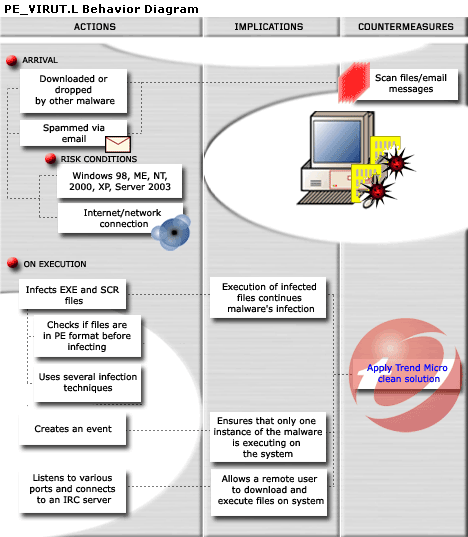
This file infector arrives on a system as a downloaded or dropped file of other malware. It may also arrive attached to spammed email messages.
It infects executed files that have .EXE and .SCR as file name extensions. It checks if the target files are in PE format before infecting it. It uses several types of infection techniques. Execution of the infected files perpetuates this virus' infection cycle. All infected files are also detected by Trend Micro as PE_VIRUT.L.
It avoids files with certain strings in their file names. It also ensures that only one instance of itself is running on the affected system's memory. These actions help prevent its immediate detection and consequent removal from an infected system.
This file infector listens to various ports and connects to an Internet Relay Chat (IRC) server where it joins a certain channel. Once connected, it allows a remote user to download and execute files on the affected system, effectively compromising the affected system's security as executed files may be malicious.
Description:
This file infector arrives as an attachment to email messages mass-mailed by another malware or a malicious user. It may be downloaded from remote sites by other malware.
It infects files of certain types. It does not infect files that contain certain strings in their file names.
It creates mutex(es) to ensure that only one instance of itself is running in memory.
Depending on your Virus Scanner, the following are its Aliases:
Virus.Win32.Virut.n (Kaspersky), W32/Virut.gen (McAfee), W32.Virut!gen (Symantec), W32/Virut.I (Avira), W32/Vetor-D (Sophos),
Solution:
Identifying the Malware Program
To remove this malware, first identify the malware program.
- Scan your computer with your Trend Micro antivirus product.
- NOTE the path and file name of all files detected as PE_VIRUT.XB.(and indeed any other alias; pls see further down highlighted in blue)
Terminating the Malware Program
This procedure terminates the running malware process. You will need the name(s) of the file(s) detected earlier.
If the process you are looking for is not in the list displayed by Task Manager, proceed to the succeeding solution set.
- Open Windows Task Manager.
• On Windows 98 and ME, press
CTRL+ALT+DELETE
• On Windows NT, 2000, XP, and Server 2003, press
CTRL+SHIFT+ESC, then click the Processes tab. - In the list of running programs*, locate the malware file(s) detected earlier.
- Select one of the detected files, then press either the End Task or the End Process button, depending on the version of Windows on your computer.
- Do the same for all detected malware files in the list of running processes.
- To check if the malware process has been terminated, close Task Manager, and then open it again.
- Close Task Manager.
On computers running all Windows platforms, if the process you are looking for is not in the list displayed by Task Manager or Process Explorer, continue with the next solution procedure, noting additional instructions. If the malware process is in the list displayed by either Task Manager or Process Explorer, but you are unable to terminate it, restart your computer in safe mode.
Important Windows ME/XP Cleaning Instructions
Users running Windows ME and XP must disable System Restore to allow full scanning of infected computers.
Users running other Windows versions can proceed with the succeeding solution set(s).
Running Trend Micro Antivirus
If you are currently running in safe mode, please restart your computer normally before performing the following solution.
Scan your computer with Trend Micro antivirus and clean files detected as PE_VIRUT.XB. To do this, Trend Micro customers must download the latest virus pattern file and scan their computer. Other Internet users can use HouseCall, the Trend Micro online virus scanner.
More about this virus from Trend Micro:Details:
This file infector arrives as an attachment to email messages mass-mailed by another malware or a malicious user.
It may be downloaded from remote site(s) by other malware.
It infects files of the following type(s):It uses any of the following types of infection techniques:
- EXE
- SCR
Infected files are also detected by Trend Micro as PE_VIRUT.XB.
- Appending
- Cavity
- Entry Point Obscuring (EPO)
It does not infect files that contain the following strings in their file names:It creates the following mutex(es) to ensure that only one instance of itself is running in memory:
- WC32
- WCUN
- WINC
- PSTO
This file infector listens to various ports and connects to an Internet Relay Chat (IRC) server where it joins a certain channel. Once connected, it allows a remote user to download and execute files on the affected system. This routine effectively compromises the affected system's security.
- VT_3
Backdoor Capabilities
This file infector connects to the IRC server(s) ircd.zief.pl.
This file infector runs on Windows 98, ME, NT, 2000, XP, and Server 2003.
Analysis By: Benson Sy; Luis Antonio P. Magisa; John Ortiz Luis
Virus.Win32.Virut.n = PE_VIRUT.L; PE_VIRUT.K-O; PE_VIRUT.DD-O; PE_VIRUT.XL; PE_VIRUT.XA; PE_VIRUT.XB
To get a one-glance comprehensive view of the behavior of this malware, refer to the Behavior Diagram shown below. (Image Ref: Trendmicro.com)
Gembe, I hope you manage to sort out your computer problem.
My advice to everyone, please take time and revisit the following thread: http://www.jamboforums.com/showthread.php?t=616. Problems, solutions and other similar issues have already been discussed.
SteveD.