Njuka II
JF-Expert Member
- Feb 25, 2019
- 414
- 733
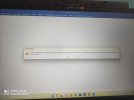
Kama umekuwa unakutana na hii page (katika picha hapo chini) kila unapofungua Microsoft applications (Ms word, Ms Excel etc) basi leo nitakuelekeza namna ya kuondoa hili tatizo, fuata hizi hatua
1. Double click "This PC" au wengine wanaita "My computer"
2. Double Click "Local disc C"
3. Double click "Program files (x86)"
4. Double Click "Common files"
5. Double click "Microsoft shared"
6. Double click "Officesoftwareprotectionplatform"
7. Right click "ospprearm.exe" then select "Run as an administrator"
Mpaka hapo utakuwa umefanikiwa kuondoa hilo tatizo, na hiyo bar nyekundu ya Product Activation Failed itapotea
Njuka II
Expert in Microsoft Applications
ebusiness.excel@gmail.com

1. Double click "This PC" au wengine wanaita "My computer"
2. Double Click "Local disc C"
3. Double click "Program files (x86)"
4. Double Click "Common files"
5. Double click "Microsoft shared"
6. Double click "Officesoftwareprotectionplatform"
7. Right click "ospprearm.exe" then select "Run as an administrator"
Mpaka hapo utakuwa umefanikiwa kuondoa hilo tatizo, na hiyo bar nyekundu ya Product Activation Failed itapotea
Njuka II
Expert in Microsoft Applications
ebusiness.excel@gmail.com